Documentation
Everything you need to know about ChatGPT++ — features, architecture, permissions, and changelog.
Overview
ChatGPT++ is a Chrome extension (Manifest V3) that enhances the ChatGPT interface with:
- Performance optimization — eliminates typing lag in long conversations
- Bulk sidebar management — select, archive, or delete multiple chats at once
- Chat vault — hide and PIN-lock sensitive conversations
- Context intelligence — real-time token usage tracking
- Export system — download conversations as PDF, Markdown, or plain text
- Zero data collection — no analytics, no tracking, no external servers
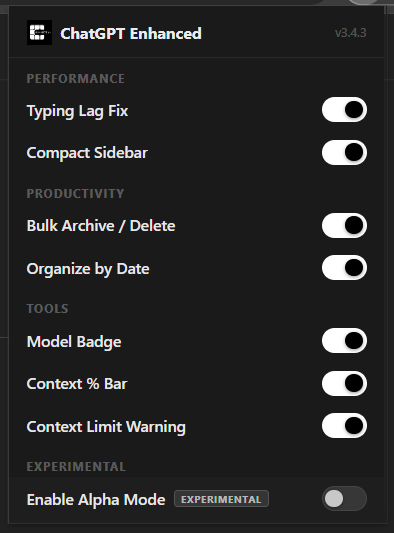
Extension popup — v3.5.0
Feature Breakdown
Typing Lag Fix
Eliminates input lag in long conversations.
How: Uses CSS content-visibility: auto to virtualize off-screen messages. An IntersectionObserver batches hide/show operations across separate read and write frames to avoid layout thrash.
Storage: No data stored.
Compact Sidebar
Collapses native sidebar navigation into a compact icon strip.
How: Discovers sidebar links via href attributes and TreeWalker text-node search. Clones each link's SVG icon into a horizontal flex grid with hover tooltips.
Storage: No data stored.
Bulk Archive / Delete
Select multiple conversations and archive or delete them at once.
How: Injects checkboxes into sidebar links. Uses ChatGPT's own REST API (PATCH /backend-api/conversation/{id}) with captured auth headers. Rate-limited with 200ms delays and exponential backoff on 429.
Storage: No data stored.
Organize by Date
Groups sidebar conversations into collapsible date buckets.
How: Fetches up to 500 conversations (paginated) from the backend API, maps each to a time bucket (Today, Yesterday, Last 7 Days, etc.), and injects collapsible heading buttons.
Storage: No data stored.
Model Badge
Shows the active AI model name in the chat header.
How: MutationObserver on the model button's aria-label attribute. Detects mid-session model downgrades using a rank table and shows a warning badge.
Storage: No data stored.
Context % Bar
Live token-usage progress bar in the chat header, with blocked-feature detection and extended system data.
How: Reads token counts from SSE stream metadata and falls back to fetching full conversation JSON. Throttled to 1 update/500ms during streaming. Detects blocked_features from /conversation/init (distinct from quota limits). Extended system data (Memory count, generated image count, Custom Instructions status) fetched in parallel from three endpoints and shown in a SYSTEM section inside the context popover. Debounced to once per 5 minutes.
Storage: No data stored.
Context Limit Warning
Warns when the model hits the context window limit.
How: Detects finish_details.type === "max_tokens" in the SSE stream and surfaces a dismissible toast with a "Start a new chat" link.
Storage: No data stored.
Secure Chat Lock
Protects conversations behind a 4-digit PIN.
How: PIN is hashed using SHA-256 via the Web Crypto API before storage. Locked chats are hidden from the sidebar. Auto-relocks after 3 minutes of inactivity.
Storage: PIN hash stored in chrome.storage.local. Locked chat IDs stored in chrome.storage.local.
Hide Chats
Temporarily hide conversations without deleting them.
How: Toggles display:none on sidebar links. Hidden chat IDs persist across sessions.
Storage: Hidden chat IDs stored in chrome.storage.local.
Export to PDF / Markdown / TXT
Export any conversation in your preferred format.
How: Walks the full message tree via linked-list traversal of the conversation API response. All rendering is client-side — no external servers.
Storage: No data stored. Files download directly to your device.
Alpha Mode
Enables experimental and unreleased features.
How: Controlled via the extension popup toggle. Gates features behind the alphaMode flag in chrome.storage.sync.
Storage: Boolean flag in chrome.storage.sync.
Export System
Generated entirely client-side. Opens a new browser window with A4-formatted print HTML and triggers window.print(). Black-and-white styling with system fonts. No external font CDN. No rendering server.
.markdown
Structured DOM parsing via the conversation API's linked-list message tree. Outputs level-1 title, metadata block, and ## USER / ## ASSISTANT sections. Pure string concatenation — zero template literals.
.plain text
Plain text fallback with [USER] / [ASSISTANT] transcript labels. 80-character readable format with metadata header. Same message tree walk as Markdown.
All exports are downloaded directly to your device. No data leaves your browser.
Permissions Explained
activeTabInteract with the ChatGPT interface on the currently active tab. Required for injecting UI enhancements.
scriptingInject the content script into ChatGPT pages. This is how all features are delivered to the page.
webRequestCapture outgoing Authorization and API headers from ChatGPT's own network requests. The content script needs these to make authenticated API calls (bulk actions, date groups, export, context bar) back to chatgpt.com.
storagePersist user preferences (feature toggles) across sessions via chrome.storage.sync, and store local data (vault PIN hash, locked chat IDs, captured headers) via chrome.storage.local.
tabsScope the extension icon to ChatGPT tabs only. The popup is disabled and greyed out on all non-ChatGPT pages.
Host permissions are scoped to chatgpt.com and *.chatgpt.com only.
FAQ
Does it send data to any server?
No. The extension runs entirely in your browser. All API calls go directly to chatgpt.com using your existing session. No data is sent to any external server, analytics service, or third party.
Does it break ChatGPT?
No. The extension only enhances the interface layer and does not modify ChatGPT's core functionality. It adds UI elements on top of the existing page without interfering with ChatGPT's own scripts or state.
Is it open source?
Yes. The full source code is publicly available for audit on GitHub. You can review every line of code before installing.
Why does it need the webRequest permission?
Content scripts can't read HTTP headers from the page's own fetch requests. The webRequest permission lets the background service worker capture ChatGPT's Authorization header so the extension can make authenticated API calls (for bulk actions, date groups, export, and context bar) back to chatgpt.com — and nowhere else.
Will it work if OpenAI updates the ChatGPT UI?
The extension relies on interface selectors. If OpenAI significantly changes the UI structure, some features may temporarily stop working. Updates are monitored and patches are released when necessary.
Is the vault encryption secure?
The PIN is hashed with SHA-256 and never stored in plaintext. The optional Base64 encryption channel is designed for incidental privacy (e.g. screen sharing) rather than adversarial security. It is not cryptographic encryption.
Changelog
v3.5.0
- Blocked feature detection — parses blocked_features from /conversation/init, distinct from quota limits
- Extended system data in Context Intelligence popover — Memory count, generated image count, Custom Instructions
- New API endpoints: /memories, /images/bootstrap, /user_system_messages
- Pill color fix — blocked status no longer affects color; red = 0 remaining, orange = ≤2
v3.4.3
- Extension icon disabled on non-ChatGPT sites
- Real product logo wired into manifest and popup
- Popup icon updated from SVG placeholder to actual logo
v3.4.2
- Fixed export template literal syntax errors in Chrome strict mode
- All export builders rewritten with zero template literals
- Regex patterns use String.fromCharCode to avoid backtick issues
v3.4.1
- Alpha Mode toggle added
- Watchdog timer for model badge and context bar self-healing
- Full black/white theme — all green/amber accents removed
- Compact popup redesign
v3.4.0
- Context bar insertion fix (overflow clipping resolved)
- Content parts API format change handled (object + string)
- Stale auth cache fix on 401 responses
- Boot retry logic for context bar and compact sidebar
- Coming soon section removed from popup
- Global scope leaks cleaned up
v3.3.0
- Date Groups feature added
- Export system (PDF, Markdown, TXT) added
- Vault encryption (Base64 channel) added
- Context popover with detailed stats
- Action bar redesigned with two-row layout
ChatGPT is a trademark of OpenAI, Inc. This extension is not created by, affiliated with, endorsed by, or sponsored by OpenAI.